with Instant Mode...

Record and share in seconds

LemonFavor is the only screen recording tool you need — three modes in one app that replace your recorder, editor, screenshot tool, and video host. Fully open source, and you can connect your own Google Drive or S3 bucket, so you own every recording.

Upgrade to LemonFavor Pro

LemonFavor Pro gives you unlimited cloud sharing, AI summaries & team features

No credit card required. Record locally, share when you choose.

App
3 Modes

One app, every workflow

Whether you need speed, studio quality, or a quick screenshot — LemonFavor has a mode for it.

Instant
Studio
Screenshot

Share instantly with a link. Your recording uploads as you record, so you can share it immediately when you're done.

Instant Mode

Share your screen or webcam instantly

Hit record, stop, and share. Your video is live with an AI-generated title, summary, chapters, and transcript — all created automatically.

How to build a React component

John Doe2 minutes ago
0:00 / 0:00

Summary

Generated by LemonFavor AI

A step-by-step walkthrough of building a reusable React component from scratch, covering props, state management, and testing best practices for production apps.

Chapters

Instant Links

Shareable URL, immediately

Background Upload

Uploads while you record

Auto Transcription

AI-generated captions

AI Summaries

Titles & descriptions

Smart Chapters

Auto-segmented timeline

Browser Viewing

No downloads required

Studio Mode

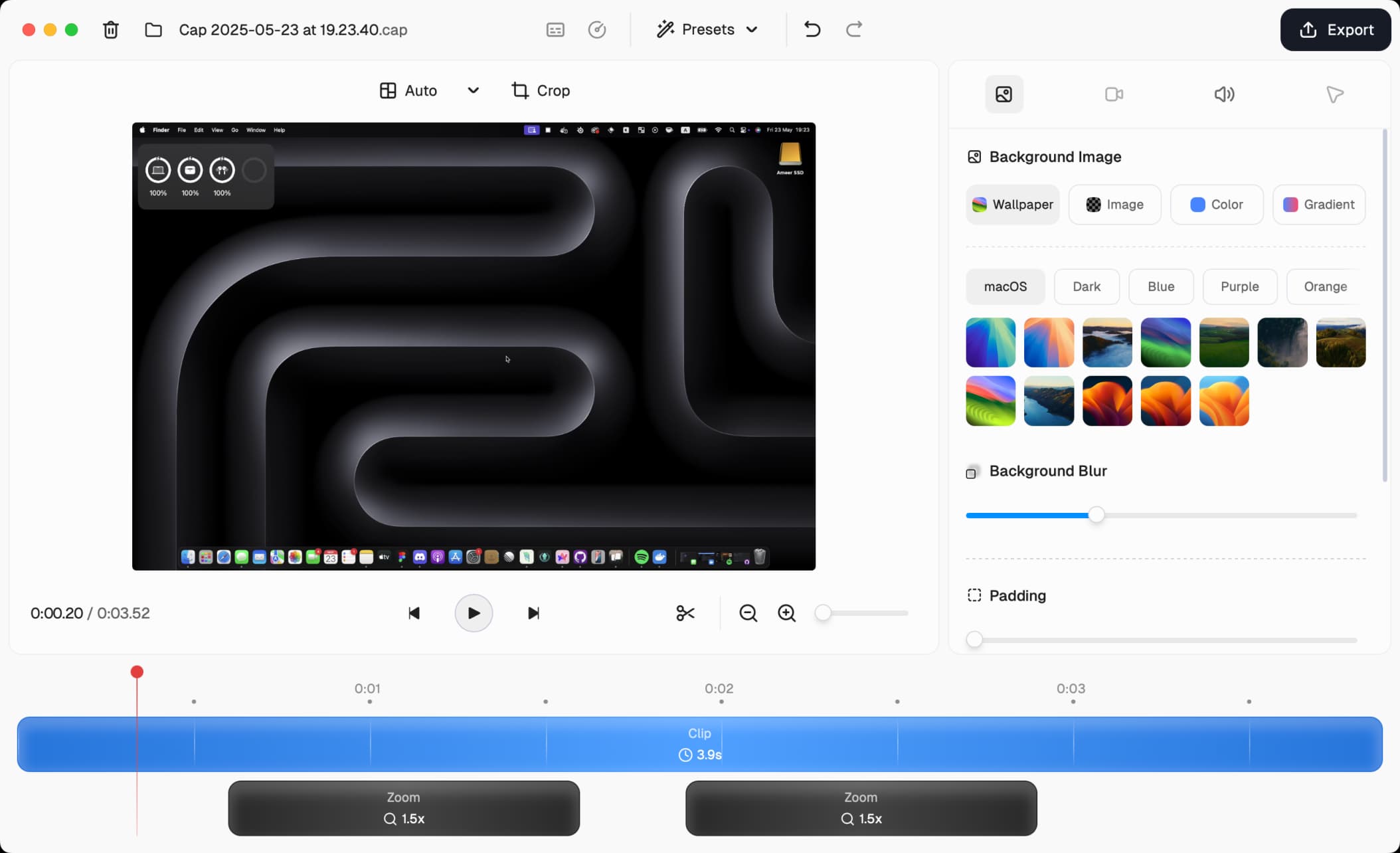
Record in full quality, edit before you share

Studio mode records at the highest quality directly to your device — no compression, no upload. Then customize backgrounds, padding, corners, and more before sharing.

My Recording.cap
Cursor
0:12
Background

Custom Backgrounds

Gradients, wallpapers & colors

Adjustable Padding

Scale from 0% to 40%

Rounded Corners

Squircle or rounded styles

Motion Blur

Natural movement effects

Shadow & Borders

Customizable depth effects

Cursor Effects

Sizing, smoothing & click effects

Screenshot Mode

Capture, beautify, share

Take a screenshot with a hotkey, then instantly enhance it with backgrounds, padding, annotations, and more — ready to share in seconds.

Screenshot.png
1
2
3
4
5
6
7
8
9
10
11
12
+
+
S

Beautiful Backgrounds

Gradients, wallpapers & solid colors

Adjustable Padding

Clean spacing around your capture

Rounded Corners

Squircle or rounded styles

Shadow & Borders

Professional depth effects

Annotation Tools

Arrows, shapes, text & masks

Instant Copy & Save

One click to clipboard or file

Built For How You Actually Work

We obsessed over the details so you don't have to. Every feature is designed to save you time and make you look good.

Cross-Platform For Your Entire Team

Native apps for macOS and Windows that feel at home on each platform, plus a Chrome extension when browser recording is the right fit. Fast, reliable recording that works with your existing tools and workflow.

Quality That Makes You Look Professional

4K recording, 60fps capture, and intelligent compression that keeps file sizes reasonable.

Your Storage, Your Rules

Connect your own Google Drive or S3 bucket, use LemonFavor Cloud, or keep everything local. You're never locked into our infrastructure, perfect for teams with compliance requirements or anyone who values data sovereignty.

Privacy by Default, Sharing by Choice

Instant sharing when you need it, local recording when you want it. Share publicly or privately, password-protect sensitive recordings, or keep them local only.

Async Collaboration That Actually Works

Comments, reactions, and transcripts keep conversations moving without another meeting. See who watched, get notified on feedback, and turn recordings into actionable next steps. Replace those "quick sync" calls for good.

Truly Open Source

See exactly how LemonFavor works, contribute features you need, or self-host for complete control. Join a community of builders who believe great tools should be transparent, extensible, and respect their users.

Speed Up Your Workflow With LemonFavor AI

Auto-generated titles, summaries, clickable chapters, and transcriptions for every recording. AI features that actually save time instead of creating more work.

Simple, Honest Pricing

Start free, upgrade when you need more. Early adopter pricing locked in forever.

Trusted by 40,000+ users

Desktop License

A commercial license for the LemonFavor desktop app — unlimited local recording and editing.

$29/ license

billed yearly

Licenses
1

$29 billed yearly

What's included

  • Commercial usage rights
  • Unlimited local recordings & editing
  • Studio Mode with full editor
  • 20 cloud shareable links / month (up to 5 min each)
  • Export to any format
  • Community support
Learn more about the commercial license
Most popular

LemonFavor Pro

Everything in Desktop, plus unlimited cloud sharing, AI, and team collaboration.

$12/ user / month

billed monthly

Users
1

Total: $12 / month

Everything in Desktop License, plus:

  • Unlimited cloud storage & bandwidth
  • Auto-generated titles, summaries, clickable chapters, and transcriptions for every recording
  • Custom domain (cap.yourdomain.com)
  • Password protected shares
  • Viewer analytics & engagement
  • Team workspaces
  • Loom video importer
  • Custom S3 bucket & Google Drive support
  • Priority support & early features

Questions? We've Got Answers.

What is the difference between LemonFavor Pro and Desktop License?

+

LemonFavor Pro is a paid plan that includes all the features of the Desktop License plus cloud features for seamless sharing and collaboration. Desktop License grants you commercial usage rights for a single user.

Is there a free version?

+

Yes! LemonFavor is 100% free for personal use. You can record and share locally with Studio Mode. A paid plan is required for commercial usage.

How long can I record for on the free version?

+

You can record for 5 minutes on the free version. After that, you'll need to upgrade to a paid plan.

How does LemonFavor AI work?

+

LemonFavor AI is a powerful tool that can be used to generate titles, summaries, clickable chapters, and transcriptions for your recordings. It's available for all LemonFavor Pro users and has no usage limits.

How is LemonFavor different from Loom?

+

LemonFavor gives you the best of both worlds: the simplicity of Loom with the power of professional tools. We're open source, support custom storage, offer better pricing, and our desktop app works offline. Plus, you actually own your content. Already using Loom? Our built-in Loom video importer makes switching effortless.

What happens to my recordings if I cancel?

+

Your recordings are yours forever. If you cancel Pro, existing shares remain active and you can always export everything. Downgrade to our free plan to keep recording locally, or self-host to maintain all features.

Do you offer team plans?

+

Yes! LemonFavor Pro includes team workspaces where you can organize recordings, manage permissions, and collaborate. Volume discounts available for teams over 10 users. Contact us for custom enterprise features.

Which platforms do you support?

+

Native desktop apps for macOS (Apple Silicon & Intel) and Windows. View your shareable links from anywhere.

Can I use LemonFavor for commercial purposes?

+

Absolutely! Any paid plan (Desktop License or LemonFavor Pro) includes full commercial usage rights. Use LemonFavor for client work, sell courses, or embed recordings anywhere. The free version is for personal use only.

Is my data secure?

+

Security is core to LemonFavor. As an open source project, our code is fully auditable and transparent — you can see exactly how your data is handled. End-to-end encryption for cloud storage, option to use your own infrastructure, and community-driven security reviews keep your content safe.

What about GDPR/HIPAA compliance?

+

LemonFavor Pro lets you bring your own storage, including custom S3 buckets in any region or your own Google Drive, for GDPR compliance. For HIPAA and other regulations, our self-hosted option gives you complete control. We also offer signed BAAs for enterprise customers.

Record.Record.Edit.Edit.Share.Share.

Ready To Upgrade How You Communicate?

or, Switch from Loom